Crawl budget SEO is the practice of managing how much of Googlebot’s limited attention your site gets, and directing that attention toward the pages that actually matter. What is crawl budget, specifically? It’s the number of URLs Googlebot is willing and able to crawl on your site within a given timeframe - a combination of your crawl rate limit (how fast Google can request pages without overloading your server) and your crawl demand (how much Google actually wants to crawl your site, based on perceived value and freshness). For most small sites, this is a non-issue - Google can crawl everything you have with room to spare. It becomes a real, measurable constraint once a site crosses roughly tens of thousands of URLs, or has a technical pattern that generates far more crawlable URLs than actual valuable content.
When crawl budget actually matters
Google has been explicit that crawl budget is not a concern for the majority of sites. It becomes relevant when:
- Your site has more than roughly 10,000-100,000+ URLs (the exact threshold isn’t fixed; it depends on how fast your important pages get discovered and re-crawled relative to how much content you publish or update)
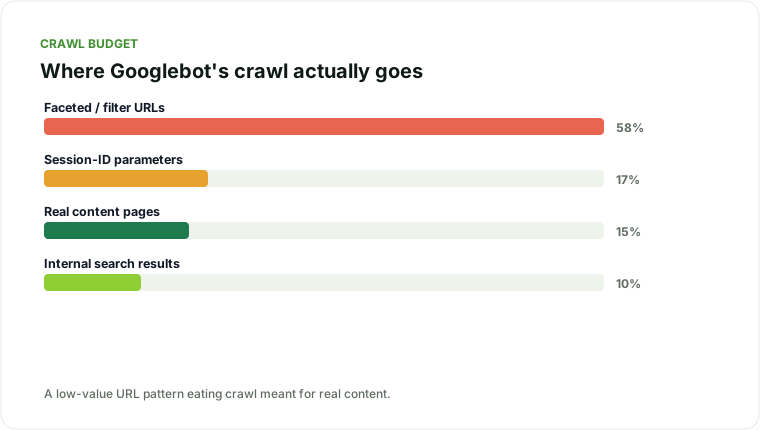
- You have faceted navigation, internal search, or parameter-based URLs generating a large multiple of low-value pages relative to your actual content count
- New or updated content takes an unusually long time to get crawled and indexed, and you’ve ruled out other indexation issues
- Server logs show Googlebot spending a disproportionate share of its crawl activity on low-value URL patterns (tracked via log file analysis)
If none of these apply, spending time optimizing crawl budget is lower priority than fixing crawlability, indexation, or content issues that affect a smaller site more directly - this is a scaling problem, not a universal one.
Crawl rate limit vs. crawl demand: why the distinction matters
These two components respond to different fixes, and conflating them leads to wasted effort:
- Crawl rate limit is about capacity - how fast Googlebot can hit your server without degrading performance for real visitors. Google adjusts this automatically based on how your server responds; a server returning errors or slow responses under Googlebot’s load gets throttled to a lower rate. The fix here is infrastructure: faster hosting, better caching, more headroom under load.
- Crawl demand is about desire - how much Google wants to crawl your site based on perceived value, freshness, and popularity. A technically fast site with low crawl demand (because content is stale or low-value) still won’t get crawled frequently. The fix here is architectural and content-driven: better internal linking, genuinely fresh and valuable content, and a clean sitemap signaling what’s worth prioritizing.
A site with high demand and low rate limit gets crawled slowly but thoroughly over time. A site with high rate limit and low demand gets crawled fast but Google simply doesn’t bother requesting much. Diagnosing which one (or both) applies to your site determines whether the fix is a server upgrade or a content and linking strategy.
How to tell if you have a crawl budget problem
The only reliable way to know is log file analysis - GSC’s Crawl Stats report gives a useful surface-level view, but server logs show exactly what Googlebot requested, when, and how often.
- Pull Googlebot requests from your server logs (or a log analyzer tool) over at least a 2-4 week window.
- Segment requests by URL pattern, not individual URL. Group by template or path structure (e.g.,
/product/,/search?,/category/) to see where crawl activity concentrates. - Compare crawl volume against actual page value. If a low-value URL pattern (internal search results, filtered/faceted variations, session-ID parameters) is consuming a large share of total crawl requests, that’s your crawl budget leak.
- Check GSC’s Crawl Stats report for a corroborating view - total crawl requests over time, broken down by response type and file type, alongside average response time. A rising crawl request count with a flat or declining count of genuinely valuable pages crawled is the pattern to look for.
- Check how long new content takes to get crawled. Publish a new page and time how long until it’s crawled (via server logs or the URL Inspection tool). If this is consistently slow relative to your publishing cadence, and your important pages aren’t being recrawled often enough to reflect updates, that’s a crawl-demand symptom worth investigating further.
How to optimize crawl budget
Eliminate or consolidate low-value URL patterns. Faceted navigation is the most common offender - filters that combine into thousands of near-duplicate URL variants. Where possible, restrict faceted combinations from being crawlable at all (via robots.txt disallow rules on parameter patterns, or a “noindex, follow” approach on combination pages that shouldn’t be indexed individually but should still pass link equity).
Fix redirect chains and broken links. Every hop in a redirect chain and every crawled 404 is a wasted crawl request that could have gone to a real page. This overlaps directly with the crawlability section of a standard technical SEO audit - cleaning this up serves both crawl efficiency and general site health.
Consolidate or remove thin, near-duplicate pages. Templated pages that are 90%+ identical (common on large e-commerce and directory sites) multiply crawlable URLs without multiplying real content. Consolidating these reduces the total crawl surface without losing anything a user actually needs.
Use robots.txt strategically, not as a blunt instrument. Disallow crawling of URL patterns that provide no unique value (internal search results, admin paths, session parameters), but be precise - an overly broad disallow rule can accidentally block content you want indexed, which is a common and costly mistake.
Improve server response time. Crawl rate is partly throttled by how well your server handles Googlebot’s requests - a server that responds slowly or errors under load gets crawled more conservatively. Faster, more reliable server responses can increase the crawl rate Google is willing to use.
Strengthen internal linking to priority pages. Crawl demand is influenced by perceived importance, and internal link structure is one of the clearest signals of importance you control directly. Orphaned or weakly linked pages get crawled less often - the same architecture principles covered in the internal linking section of a full technical audit apply directly here.
Keep your XML sitemap clean and current. A sitemap containing outdated, redirected, or non-canonical URLs sends mixed signals about what deserves crawl priority. Regenerate it to reflect only current, canonical, indexable URLs, and resubmit after significant structural changes.
Manage crawl-heavy dynamic content deliberately. Sites with large amounts of frequently updated or user-generated content (marketplaces, forums, large content hubs) should think explicitly about crawl prioritization - using sitemaps’ lastmod dates accurately, and structuring internal linking so genuinely fresh, important content surfaces quickly to crawlers rather than being buried under volume.
Tools for ongoing crawl budget monitoring
Once you’ve identified a crawl budget issue and started fixing it, keep monitoring rather than treating it as a one-time project:
- GSC Crawl Stats report, checked monthly, for total requests, response breakdown, and average response time trends.
- Server log analysis, ideally automated with a recurring export rather than a one-off pull, especially on sites where new URL-generating features (filters, search, user-generated pages) ship regularly and can silently reintroduce the problem.
- A recurring sitemap audit to catch drift - new low-value URL patterns getting swept into the sitemap as the site evolves, undoing prior cleanup.
- Time-to-index tracking on a sample of new pages each month, as a leading indicator of whether crawl demand for your site is improving or degrading over time.
The relationship between crawl budget and indexation
Crawl budget issues often masquerade as indexation issues, and it’s worth being precise about the difference. A page stuck in “Discovered - currently not indexed” in Search Console might be a crawl-budget symptom (Google knows the URL exists but hasn’t prioritized crawling it yet) rather than a quality judgment about the page itself. This distinction matters because the fix is different: a genuine quality-based exclusion needs content improvement, while a crawl-budget-driven delay needs the URL-pattern and internal-linking fixes above, not a content rewrite.
If you’re seeing large numbers of pages sitting in “Discovered” or “Crawled - currently not indexed” and you’ve ruled out content quality as the cause, revisit your crawl budget allocation before assuming every one of those pages individually needs a content upgrade.
Common mistakes when addressing crawl budget
- Blocking too aggressively. A robots.txt disallow rule written to solve a crawl budget problem can accidentally block a URL pattern that included some genuinely valuable pages mixed in with the low-value ones. Segment carefully before writing a blanket rule.
- Noindexing instead of disallowing (or vice versa) without understanding the difference. A
noindextag still requires Google to crawl the page to see the tag - it doesn’t save crawl budget, it only keeps the page out of the index. A robots.txt disallow prevents crawling entirely but also prevents Google from seeing anynoindexinstruction on that page. Choose based on whether you want the page crawled-but-not-indexed or not crawled at all. - Fixing crawl budget while ignoring why the low-value URLs exist in the first place. Faceted navigation and parameter URLs are usually a legitimate feature (users need to filter and sort). The fix should manage how those variants are exposed to crawlers, not necessarily rip out functionality real visitors depend on.
- Treating this as a one-time cleanup. As covered above, new low-value URL patterns creep back in as a site adds features. Without recurring monitoring, a fixed crawl budget problem tends to slowly reappear over the following year.
A scaling problem, not a small-site problem
Crawl budget is worth understanding early even if it doesn’t apply to your site yet, because the patterns that cause it (faceted navigation, parameter-heavy URLs, thin templated pages) tend to get built into a site’s architecture from day one and become progressively harder to unwind as the site grows. If you’re planning a site that will scale into the tens of thousands of pages - a marketplace, a large content hub, a directory - it’s worth auditing this before it becomes a genuine constraint rather than after.
If your site has grown to the point where new content takes weeks to get crawled, or you suspect crawl budget is quietly capping your growth, that’s exactly the kind of technical constraint my SEO recovery services are built to diagnose against your actual server logs and Search Console data.
Traffic sliding, or planning a risky migration?
I diagnose why organic traffic dropped and reverse it - core updates, migrations, cannibalization, technical decay.
Explore SEO recovery services